DevOps Training Material
Understanding cron
Cron is a UNIX, Solaris utility that allows tasks to be automatically run in the background at regular intervals by the cron daemon. These tasks are often termed as cron jobs in UNIX, Solaris. Crontab (CRON Table) is a file which contains the schedule of cron entries to be run and at specified times.
Restrictions
You can execute crontab if your name appears in the file /usr/lib/cron/cron.allow.
If that file does not exist, you can use crontab if your name does not appear in the file /usr/lib/cron/cron.deny. If only cron.deny exists and is empty, all users can use crontab. If neither file exists, only the root user can use crontab. The allow/deny files consist of one user name per line.
Command
| Command | Description |
|---|---|
export EDITOR=vi |
To Edit the crontab in VI |
crontab -e |
Edit crontab file, or create new |
crontab -l |
Display crontab file |
crontab -r |
Remove crontab file |
crontab -v |
Display the last time you edited your crontab |
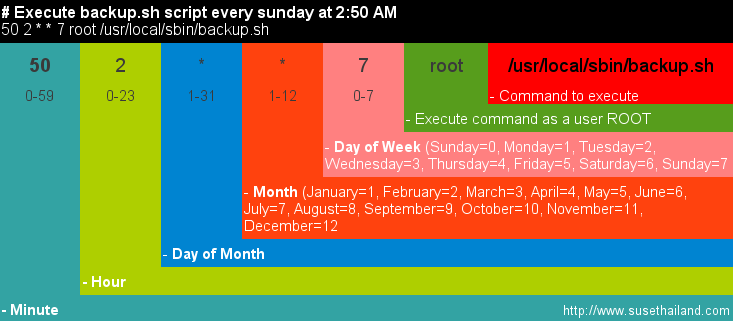
Crontab Format
The following is the format entries in a crontab must be. Note all lines starting with # are ignored, comments.
Examples
Here are a few examples, to see what some entries look like.
# Run command at 7:00am each weekday [mon-fri]
00 07 * * 1-5  mail_pager.script 'Wake Up'

# Run command on 1st of each month, at 5:30pm
30 17 1 * *   pay_rent.scrip

# Run command at 8:00am,10:00am and 2:00pm every day
00 8,10,14 * * *   do_something.script

# Run command every 5 minutes during market hours
/5 6-13 * mon-fri   get_stock_quote.script

# Run command every 3-hours while awake
0 7-23/3 * * *   drink_water.script
Special Characters in Crontab
You can use an asterisk in any category to mean for every item, such as every day or every month.
You can use commas in any category to specify multiple values. For example: mon,wed,fri
You can use dashes to specify ranges. For example: mon-fri, or 9-17
You can use forward slash to specify a repeating range. For example: */5 for every five minutes, hours, days
TWEAK : Running a job in fraction on a minute
# Running a job in every 30 seconds
*/25 * * * * the_task
*/25 * * * * sleep 30 ; the_task
Special Entries
There are several special entries, some which are just shortcuts, that you can use instead of specifying the full cron entry.
The most useful of these is probably @reboot which allows you to run a command each time the computer gets reboot. This could be useful if you want to start up a server or daemon under a particular user, or if you do not have access to the rc.d/init.d files.
Example Usage:
# restart freevo servers
@reboot freevo webserver start
@reboot freevo recordserver start
Full list
| Entry | Description | Eqivalent To |
|---|---|---|
@reboot |
Run once, at startup. | None |
@yearly |
Run once a year | 0 0 1 1 * |
@annually |
(same as @yearly) | 0 0 1 1 * |
@monthly |
Run once a month | 0 0 1 * * |
@weekly |
Run once a week | 0 0 * * 0 |
@daily |
Run once a day | 0 0 * * * |
@midnight |
(same as @daily) | 0 0 * * * |
@hourly |
Run once an hour | 0 * * * * |
Miscelleanous Issues
Script Output
If there is any output from your script or command it will be sent to that user’s e-mail account, on that box. Using the default mailer which must be setup properly.
You can set the variable MAILTO in the crontab to specify a separate e-mail address to use. For example:
MAILTO="admin@mydomain.com"
Redirect Output to /dev/null
You can redirect the output from a cron script to /dev/null which just throws it away. By redirecting to /dev/null you will not receive anything from the script, even if it is throwing errors.
* * * * * /script/every_minute.pl > /dev/null 2>&1
Timezone
If you want to run cron at a different timezone than your system time. You can set the TZ parameter in /etc/default/cron. For example, I want it to run in Pacific Time zone, so I set:
TZ="America/Los_Angeles"
Missed Schedule Time
Cron does not run a command if it was missed. Your computer must be running for cron to run the job at the time it is scheduled. For example, if you have a 1:00am scheduled job and your computer was off at that time, it will not run the missed job in the morning when you turn it on.